

Table of Contents
1. Items #
Items are the goods or services that you deal with in your business.
Whenever you create transactions for your customers or vendors, you can add these items and their details will be auto-populated.
- Create Items
To create an item in Erpisto:
- Go to the Items module in the left sidebar and select Items.
- Click + New on the right side of the page.
- Enter the Type, Name and other details.
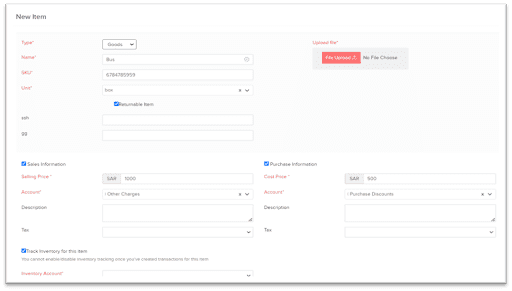
- Sales Information
| Fields | Description |
| Rate | Rate at which you sell the item to your customers. This rate will be reflected on your sales transactions like invoices, sales orders, etc. |
| Account | Account used to track sales of the item. |
| Description | Add notes related to sales of the item |
- Purchase Information
| Fields | Description |
| Rate | Rate at which you buy the item from your vendors. This rate will be reflected on your purchase transactions like bills, purchase orders, etc. |
| Account | The Cost of Goods Sold account is used for tracking the purchase made for items in Erpisto. |
| Description | Add notes related to purchases of the item. |
- Inventory Information
To enable inventory for the item:
- Select the box Track Inventory for this item.
- Fill in the required fields.
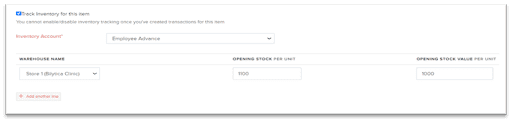
| Fields | Description |
| Account | Account which tracks the inventory of the item. By default, it is an Inventory Asset. |
| Opening Stock | Quantity of the item which you have in hand on the opening balance date. |
| Opening Stock rate per unit | Cost at which you purchased the item for the opening stock. |


